Showing posts with label gadgets. Show all posts
Sunday, November 20, 2011
Kindle Fire - Additional Observations
I'm still just nibbling around the edges of Kindle Fire ownership. This afternoon, after #CatAvailabilityTime, I watched Season 1, Episode 1, of Dr. Who. I had grave reservations about watching video streamed over Wi-Fi (specifically, from my Wi-Fi WAP), but the experience was surprisingly pleasant. I had anticipated hiccups ("Buffering..." pop-ups) occurring every few minutes. This did not happen. The video was smooth and absolutely free of jerky hiccups. There was a problem about a third of the way through the viewing: "Network connection lost" (to paraphrase). I don't know if the problem was due to Amazon overload or my WAP's flakiness. At any rate, after a couple of minutes, I was able to resume viewing and there were no further interruptions during the 45 minutes of the Dr. Who episode.
Thanks to my extreme nearsightedness, the viewing experience was extremely immersive. I watched the show without contacts (screen about 4" away from my eyes) and wearing good quality headphones. So... my sympathy to all you folks who are not debilitatingly nearsighted.
I continue to struggle with the lack of a few critical apps on the Amazon store. Dropbox I have mentioned. I can use Google Docs as a web application, but it would be so much better as an Android app! Google has provided a pretty slick mobile web UI, but dammit--I want a native app!
I find it ironic that the Google App Store offers some pretty cool apps for interfacing with Amazon, while Amazon has yet to offer an easy way to interface with Google. ::Sigh::
Friday, November 18, 2011
Kindle Fire - First Impressions
I received my Kindle Fire the day after the official release date. Truth to tell, I've not had a chance to do much with it, but for the sake of currency, here are my first impressions.
I have a Droid X smartphone, so my truly first impression was that the Kindle Fire is a 3X-sized Droid. Perhaps not surprising since the Fire runs the Android OS, as does the Droid.
The Fire fits snugly in the custom designed Malware (sorry!!! "Marware") protective case. Usually with portable devices I purchase an adhesive, protective cover. I did not do that with my Kindle Keyboard and I will probably not do that with my Fire. Big ol' screen, ya know--and it is touted as being extremely tough. We'll see.
If you have an Android phone, you will be immediately comfortable with the Fire's user interface. At times, I found myself reaching for the hardware buttons below the screen that I would find if I were using my Droid. Adjusting to a world of purely soft buttons is going to be a learning curve!
I do not own an iPod Touch (just a 160GB iPod Classic), but I have the feeling that the Fire is like a huge iPod Touch. It is a tablet, yes, but the emphasis is on entertainment. You've got your music, video, and eBooks. I've been a subscriber to Amazon Prime for a while so I already have the ability to stream any of their (many) movies and TV shows free of charge. A search for content using the phrase "Mystery Science Theater" turned up 76 matches. Impressive.
Downloading apps works very much like it does on an Android phone. The difference would be that, rather than tapping the Android Market Place for apps, you'd be tapping the Amazon App Store. There are some disturbing gaps here. For example, Dropbox is not available from the Amazon App Store. I've come across several sets of instructions for getting Dropbox on your Fire, but come on... this should be in the App Store! I've also read complaints to the effect that Amazon's App Store does not offer the latest versions of many programs. To some extent, I applaud Amazon's attempt to put a quality/security filter on the App Store. I just wish that the "major" apps were available in their most current incarnations on a timely basis.
From an ergonomic standpoint, I have few complaints. Using the Fire feels perfectly natural. So far, I've not found a way to install and enable the Swype keyboard, which is my KB of choice on the Droid. At times it seems like the soft buttons at the bottom of the screen are reluctant to respond to my touch--maybe my fingers are too dry... I'm not sure yet.
As for the comparison of Kindle Fire and Kindle Keyboard, I consider these two devices quite separate. If I want to read the text of a novel, I will use the Kindle Keyboard. The battery life is amazing and the screen is beautifully legible in bright sunlight. The Kindle Fire is my multimedia entertainment device and my portable web browser.
I tend to be suspicious of corporations mining my web presence for marketing data, but I consider Amazon to be one of the "good guys" along with Google. They're all business enterprises so, yeah, they're going to try to make money. As long as all the cards are on the table, I don't have a problem with that. When I read that Amazon's Silk browser caches content on Amazon servers, I'm like yay go, Amazon. They're trying to make the Fire web browser as responsive as possible. Technically, it's storing personal data that, in a perfect world, it should not. But hey, I could sit inside a cave with no electrical power (let alone internet access) and be smug as Shinola in my locked-down egosphere. I'd rather play it a little more loose than that, though. I'm not ready to move to Idaho just yet.
Okay, so... more to come (it says here).
Friday, June 24, 2011
A Slight Kindle Problem
I love my Kindle! I'm currently reading H. P. Lovecraft's short stories during my lunch breaks. The Kindle is lightweight, attractive, easy to use, and easy on the eyes.
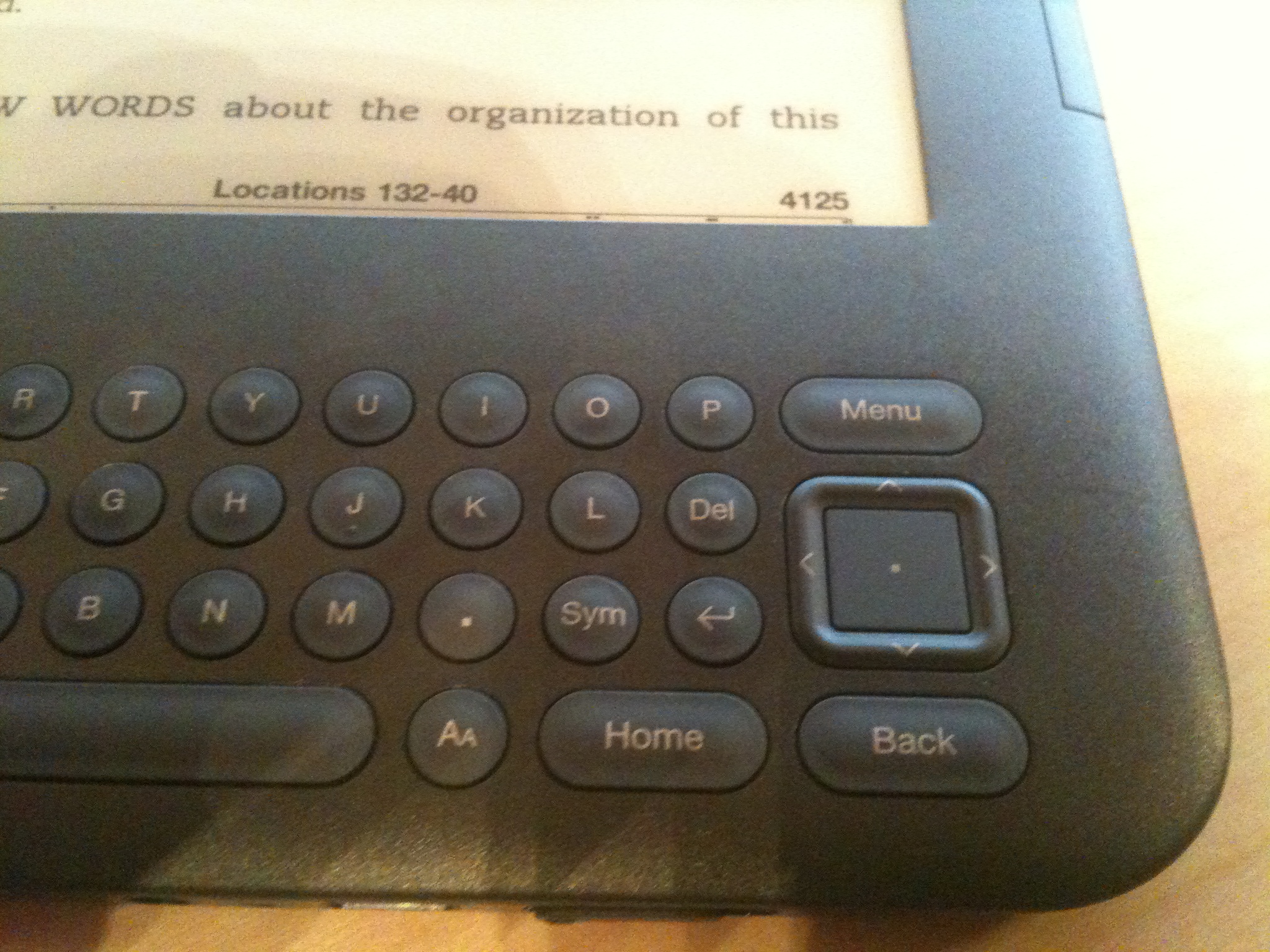
There is one design flaw, however. To move the cursor, you press on the tiny edges of a square cursor movement button. I use my thumbnail to do this. It could be easier, but that's not my complaint. Closely below the Down Arrow edge of the cursor button is a Back key. It turns out that it's very easy to accidentally press the Back key while moving the cursor down--I've done it 3 times now. If you're in the middle of a book, this might pop you back to the list of books on the Kindle. To get back to the page you were reading, you just press the Forward key, right? Surprise! There is no Forward key!
To get back to your place in the book, you can use a Go To feature and specify a location code, which is similar to a page number. If you recognize that this puts you on text you've read recently, you can page forward until you find your place. I've started placing a bookmark on the page I'm on when I quit reading for the day. This helps, but it clutters up your list of notes and bookmarks.
Others have suggested (and I agree) that Amazon should change the Kindle software to recognize Alt+Back as "Forward". This would neatly solve the problem without a physical change.
If you have a Kindle 3 and have run into the Back key problem, please drop a note to kindle-feedback@Amazon.com and suggest that they implement the Alt+Back solution.
Tuesday, June 7, 2011
I Have Become a Kitchen Gadget Geek
I used to think that a coffee maker and an Osterizer blender were all the gadgets I needed for my kitchen. I've accumulated a few others over the years, but this year I've zoomed past the tipping point and am boosting Amazon's share price with all my orders. The shopping spree started when the food processor attachment of my immersion blender broke while I was using it to crush ice. That accident inspired two purchases: a Cuisinart food processor and a dedicated ice crusher.
It took me a while to get around to using these devices, but over Memorial Day I finally made coleslaw with the food processor and made a whiskey sour with the help of the ice crusher. The food processor is very fast and efficient, but you still have to prep the ingredients and cleanup can take a while. Then again, the coleslaw recipe involves 3 different blades, so there were a lot of parts to clean. The ice crusher is great for one or two people, but at 15 seconds per ice cube, this model would not be suitable for a party situation.
My one remaining jar opener was very old and had developed some tears, so I treated myself to a new set.
I'd been wanting a bread box for a while. Since I was on a roll, I picked one up from Amazon.
It works well! It kept a loaf of home-made bread fresh for almost 2 weeks.
After finally using the food processor, I realized that it would be difficult to store the blades and discs safely. I didn't want to just toss them into a drawer. Fortunately, Cuisinart offers a blade-and-disc holder. This was my next acquisition.
Having made a pitcher of sangria last year with fresh citrus fruits, I was well aware of how tedious it is to juice by hand. Even juicing one or two limes is a pain because the pulp and seeds clog up the slots in my cheap hand juicer. I decided to get a good quality juicing machine.
I used this last night to juice 6 limes. The limes needed to be peeled before juicing, which took a bit of time. The actual juicing was done in seconds, but the cleanup, especially of the fine mesh basket, took a while. The juice was excellent--not overpoweringly sour like bottled juice. There was a little bitterness (not necessarily a bad thing) from the pith, and it was also a little foamy from the pith.
After researching how best to prepare citrus fruits for juicing, I realized that a dedicated citrus juicer was probably the way to go. You only have to cut the fruit in half and the rind is left intact. So, this morning, I placed an order for a citrus juicer.
I expect this to be delivered on Saturday. I'm sure I'll get plenty of use out of the other juicing machine for such things as berries and vegetables.
My credenza in the dining room is now covered with gadgets. My kitchen and dining room are actually one large room. The kitchen part is pretty small--virtually no counter space for gadgets. I think I'm going to remove and store my espresso maker because I haven't used that in a couple of years.
It took me a while to get around to using these devices, but over Memorial Day I finally made coleslaw with the food processor and made a whiskey sour with the help of the ice crusher. The food processor is very fast and efficient, but you still have to prep the ingredients and cleanup can take a while. Then again, the coleslaw recipe involves 3 different blades, so there were a lot of parts to clean. The ice crusher is great for one or two people, but at 15 seconds per ice cube, this model would not be suitable for a party situation.
My one remaining jar opener was very old and had developed some tears, so I treated myself to a new set.
I'd been wanting a bread box for a while. Since I was on a roll, I picked one up from Amazon.
It works well! It kept a loaf of home-made bread fresh for almost 2 weeks.
After finally using the food processor, I realized that it would be difficult to store the blades and discs safely. I didn't want to just toss them into a drawer. Fortunately, Cuisinart offers a blade-and-disc holder. This was my next acquisition.
Having made a pitcher of sangria last year with fresh citrus fruits, I was well aware of how tedious it is to juice by hand. Even juicing one or two limes is a pain because the pulp and seeds clog up the slots in my cheap hand juicer. I decided to get a good quality juicing machine.
I used this last night to juice 6 limes. The limes needed to be peeled before juicing, which took a bit of time. The actual juicing was done in seconds, but the cleanup, especially of the fine mesh basket, took a while. The juice was excellent--not overpoweringly sour like bottled juice. There was a little bitterness (not necessarily a bad thing) from the pith, and it was also a little foamy from the pith.
After researching how best to prepare citrus fruits for juicing, I realized that a dedicated citrus juicer was probably the way to go. You only have to cut the fruit in half and the rind is left intact. So, this morning, I placed an order for a citrus juicer.
I expect this to be delivered on Saturday. I'm sure I'll get plenty of use out of the other juicing machine for such things as berries and vegetables.
My credenza in the dining room is now covered with gadgets. My kitchen and dining room are actually one large room. The kitchen part is pretty small--virtually no counter space for gadgets. I think I'm going to remove and store my espresso maker because I haven't used that in a couple of years.
Subscribe to:
Posts (Atom)