(Note: If you're not one of my tweeps, please disregard this post.)
Several years ago, I became obsessed with reading Greek history. Specifically, I was interested in Herodotus, Thucydides, and I dabbled a bit in the age of Alexander the Great.
One consequence of this obsession was that I stopped reading "Asimov's Science Fiction Magazine". I had a subscription to the 'zine and continued to receive issues for years. I may still be receiving them--I'm not sure.
I've moved on from Greek history (at least temporarily), but now I'm all excited about reading eBooks on my Kindle.
The upshot of all of this is that I have a large stack of unread IASFM issues just taking up space. If any of my tweeps would be interested in receiving a box of these magazines, please DM me on Twitter. Please understand that I will be biased in favor of my closest tweeps--it's not strictly first-come-first-served. I will gladly pay for postage. You'll be doing me a favor.
Thanks for your attention!
Showing posts with label eBooks. Show all posts
Saturday, December 3, 2011
Offer To My Tweeps
Sunday, November 20, 2011
Kindle Fire - Additional Observations
I'm still just nibbling around the edges of Kindle Fire ownership. This afternoon, after #CatAvailabilityTime, I watched Season 1, Episode 1, of Dr. Who. I had grave reservations about watching video streamed over Wi-Fi (specifically, from my Wi-Fi WAP), but the experience was surprisingly pleasant. I had anticipated hiccups ("Buffering..." pop-ups) occurring every few minutes. This did not happen. The video was smooth and absolutely free of jerky hiccups. There was a problem about a third of the way through the viewing: "Network connection lost" (to paraphrase). I don't know if the problem was due to Amazon overload or my WAP's flakiness. At any rate, after a couple of minutes, I was able to resume viewing and there were no further interruptions during the 45 minutes of the Dr. Who episode.
Thanks to my extreme nearsightedness, the viewing experience was extremely immersive. I watched the show without contacts (screen about 4" away from my eyes) and wearing good quality headphones. So... my sympathy to all you folks who are not debilitatingly nearsighted.
I continue to struggle with the lack of a few critical apps on the Amazon store. Dropbox I have mentioned. I can use Google Docs as a web application, but it would be so much better as an Android app! Google has provided a pretty slick mobile web UI, but dammit--I want a native app!
I find it ironic that the Google App Store offers some pretty cool apps for interfacing with Amazon, while Amazon has yet to offer an easy way to interface with Google. ::Sigh::
Friday, June 24, 2011
A Slight Kindle Problem
I love my Kindle! I'm currently reading H. P. Lovecraft's short stories during my lunch breaks. The Kindle is lightweight, attractive, easy to use, and easy on the eyes.
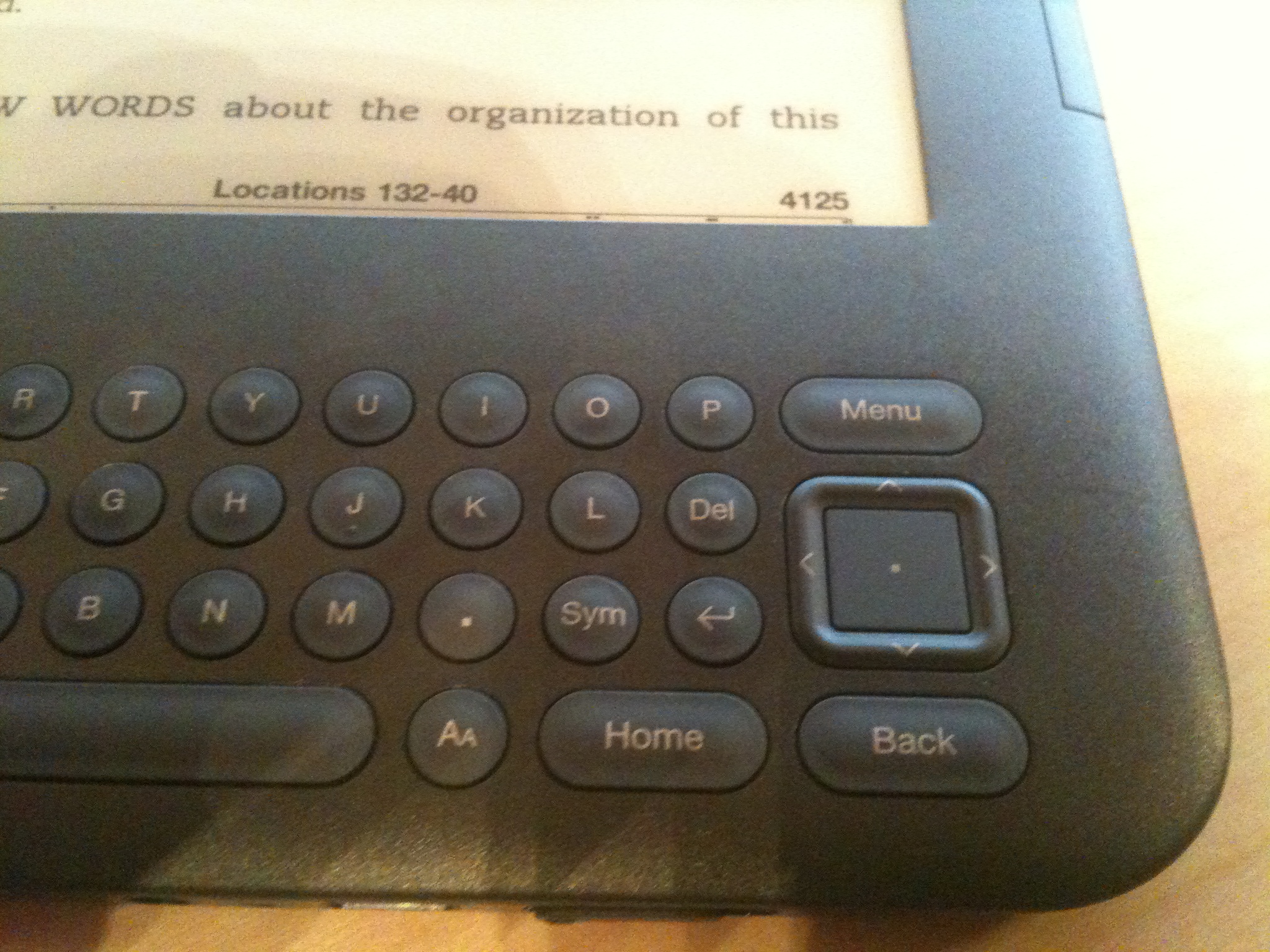
There is one design flaw, however. To move the cursor, you press on the tiny edges of a square cursor movement button. I use my thumbnail to do this. It could be easier, but that's not my complaint. Closely below the Down Arrow edge of the cursor button is a Back key. It turns out that it's very easy to accidentally press the Back key while moving the cursor down--I've done it 3 times now. If you're in the middle of a book, this might pop you back to the list of books on the Kindle. To get back to the page you were reading, you just press the Forward key, right? Surprise! There is no Forward key!
To get back to your place in the book, you can use a Go To feature and specify a location code, which is similar to a page number. If you recognize that this puts you on text you've read recently, you can page forward until you find your place. I've started placing a bookmark on the page I'm on when I quit reading for the day. This helps, but it clutters up your list of notes and bookmarks.
Others have suggested (and I agree) that Amazon should change the Kindle software to recognize Alt+Back as "Forward". This would neatly solve the problem without a physical change.
If you have a Kindle 3 and have run into the Back key problem, please drop a note to kindle-feedback@Amazon.com and suggest that they implement the Alt+Back solution.
Wednesday, April 13, 2011
eBooks?
Do I Need An eBook Reader?
Recently, I've been enjoying reading The Iliad on my Droid X using Kindle for Android. The eBook was free and I needed something to read during lunch breaks.
The nicest aspect of reading a book this way is that I can highlight a word and pull up either its definition on Dictionary.com or its Wikipedia article. The Iliad is not an easy read because the characters can go by several names. For example, Agamemnon is also referred to as The King of Men, Atreus' Son, and Atreides. To make matters worse, the last two names could also refer to Menelaus, Agamemnon's brother, who is also a Trojan War combatant. The instant, no-typing Wikipedia look-up is a great aid to comprehension.
I've started to seriously consider buying a Kindle. I'd always thought that a dedicated eBook reader would be a waste of money. Why buy a Kindle when for a bit more money you could buy an iPad which could serve as an eBook reader and so much more? After some thought and research (Ha! Mostly reading Amazon's pro-Kindle propaganda!) I decided that there would be advantages to using an eBook reader:
If you've ever tried to use your smartphone or a car navigation system in bright sunlight, you know how difficult it is to do. Since the Kindle uses "E Ink", the screen is (purportedly) legible in direct sunlight, just as a physical book would be.
When I used reading glasses, at first I couldn't use them for computer work. The glasses made the view of the screen sharper, but that meant I could distinguish the pixels that made up the letters of text. The text on a Kindle screen is sharper and more easily legible than the text on a standard computer screen.
Battery Life
I plug my Droid in several times a day to recharge. I haven't used an iPad, but I'm pretty sure they need to be recharged daily when heavily used. The Kindle uses power to render a page of text on the screen but does not require power to maintain the image. For that reason, the Kindle would only need to be recharged every 2-4 weeks. That's a huge difference, especially if you wanted to read on a trip away from home.
Convenience
Since the Kindle is a dedicated eBook reader, it's more of an "appliance" than a computer. In many ways it's hard-wired to do what you want it to do.
Disadvantages
If you buy a Droid phone, you've got to drink the Google kool-aid. Likewise if you buy a Kindle, you've got to drink the Amazon kool-aid. I've been an Amazon customer for a long time, so I'm fairly comfortable with them as a company. Still, as I accumulate a collection of eBooks, I have to accept the fact that they'll be locked in a cabinet to which Amazon holds the key. Technology evolves and formats change. There will always be a chance that my eBooks could become unusable with little or no warning. Given the number of books that I've read once and then packed away in boxes in the basement, I think I'm willing to run the risk of losing most of my collection. There are some books that I reread or that I refer to occasionally. I'll either want physical copies of those books or find a way to back up the eBook in a non-proprietary format.
The Decision
I'm waiting to hear the opinion of a librarian/author friend before I place the order for a Kindle. I'm sure she's thought a lot about eBooks and she might point something out to me that I hadn't considered.
Recently, I've been enjoying reading The Iliad on my Droid X using Kindle for Android. The eBook was free and I needed something to read during lunch breaks.
The nicest aspect of reading a book this way is that I can highlight a word and pull up either its definition on Dictionary.com or its Wikipedia article. The Iliad is not an easy read because the characters can go by several names. For example, Agamemnon is also referred to as The King of Men, Atreus' Son, and Atreides. To make matters worse, the last two names could also refer to Menelaus, Agamemnon's brother, who is also a Trojan War combatant. The instant, no-typing Wikipedia look-up is a great aid to comprehension.
I've started to seriously consider buying a Kindle. I'd always thought that a dedicated eBook reader would be a waste of money. Why buy a Kindle when for a bit more money you could buy an iPad which could serve as an eBook reader and so much more? After some thought and research (Ha! Mostly reading Amazon's pro-Kindle propaganda!) I decided that there would be advantages to using an eBook reader:
- Legibility
- Battery Life
- Convenience
If you've ever tried to use your smartphone or a car navigation system in bright sunlight, you know how difficult it is to do. Since the Kindle uses "E Ink", the screen is (purportedly) legible in direct sunlight, just as a physical book would be.
When I used reading glasses, at first I couldn't use them for computer work. The glasses made the view of the screen sharper, but that meant I could distinguish the pixels that made up the letters of text. The text on a Kindle screen is sharper and more easily legible than the text on a standard computer screen.
Battery Life
I plug my Droid in several times a day to recharge. I haven't used an iPad, but I'm pretty sure they need to be recharged daily when heavily used. The Kindle uses power to render a page of text on the screen but does not require power to maintain the image. For that reason, the Kindle would only need to be recharged every 2-4 weeks. That's a huge difference, especially if you wanted to read on a trip away from home.
Convenience
Since the Kindle is a dedicated eBook reader, it's more of an "appliance" than a computer. In many ways it's hard-wired to do what you want it to do.
Disadvantages
If you buy a Droid phone, you've got to drink the Google kool-aid. Likewise if you buy a Kindle, you've got to drink the Amazon kool-aid. I've been an Amazon customer for a long time, so I'm fairly comfortable with them as a company. Still, as I accumulate a collection of eBooks, I have to accept the fact that they'll be locked in a cabinet to which Amazon holds the key. Technology evolves and formats change. There will always be a chance that my eBooks could become unusable with little or no warning. Given the number of books that I've read once and then packed away in boxes in the basement, I think I'm willing to run the risk of losing most of my collection. There are some books that I reread or that I refer to occasionally. I'll either want physical copies of those books or find a way to back up the eBook in a non-proprietary format.
The Decision
I'm waiting to hear the opinion of a librarian/author friend before I place the order for a Kindle. I'm sure she's thought a lot about eBooks and she might point something out to me that I hadn't considered.
Subscribe to:
Posts (Atom)